To load shared emails, Drag needs permission to the email owner's Gmail account (the person who originally received the emails). If that permission is lost, boards linked to that inbox stop receiving new emails in real time, and cards from that owner become inaccessible until you re-authenticate.
Available on: Chrome extension · Web app · Desktop app
Common reasons permission is lost
- The password changed. The most common cause. After a password change, that account has to be re-authenticated in Drag.
- The email owner was removed from the board. If someone shared their own emails on a board and then left or was removed, those emails are no longer accessible. Re-invite the user to the board to restore access.
- The owner revoked Drag's access. Anyone can remove Drag from their Google account permissions. Signing back in and granting access again restores the connection.
- The account was inactive for 6 or more months. Gmail automatically revokes third-party access after long inactivity.
- Many logins at once from different locations. Gmail may treat this as suspicious and revoke access automatically.
How to reconnect
- Log in to the original account in Gmail and enable Drag.
- Re-authenticate the account when prompted.
If the re-authentication prompt does not appear:
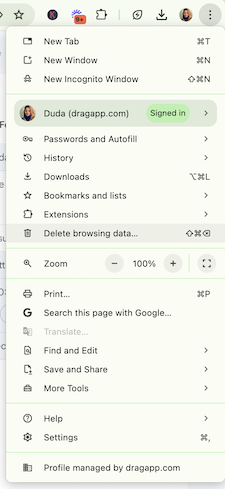
Open your browser's Delete browsing data.
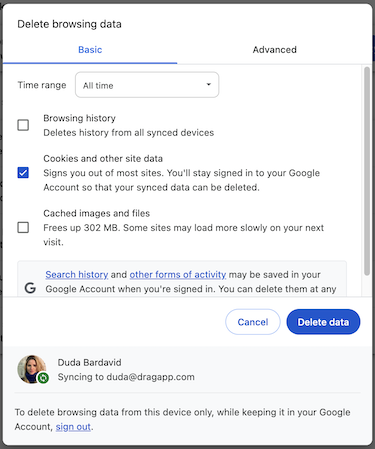
Choose All time, check Cookies and other site data, and click Delete data.
- Go back to Gmail, refresh the page, and re-authenticate when prompted.
If you still need help, contact us at support@dragapp.com.